Login to your account
or
The mailbox user already exists
By clicking 'Download File,' you agree to our Terms and conditions and Privacy policy
split_pdf
Save document as
Please select a file to save
docx DOCX
pdf PDF
odt ODT
txt TXT
dotx DOTX
pdfa PDF/A
ott OTT
rtf RTF
docxf DOCXF
oform OFORM
html HTML
fb2 FB2
epub EPUB
xlsx XLSX
pdf PDF
ods ODS
csv CSV
xltx XLTX
pdfa PDF/A
ots OTS
pptx PPTX
pdf PDF
odp ODP
potx POTX
pdf PDF/A
otp OTP
png PNG
jpg JPG
close

Split PDF

Divide a specific range of pages, individual pages, or all pages of a document into separate PDF files.

Do not close your browser Wait until your files are uploaded and processed! This might take a few minutes. :)
officeedit Next Next
file icon
Size
Ddfdf.pptx
5.2MB
VIEW
edit_file
How to Split PDF
Step 1: Upload
Upload files to our online PDF splitter.
add file
Edit
Step 2: Click 'Convert'
Select the PDF pages you need to split.
Step 3: Download
Preview, edit, or download your split files.
add file

What this free split PDF online tool supports

ABCD Office divides PDFs in your browser — upload on abcdoffice.com/split-pdf.html, choose pages or ranges, split into separate files, and download without Adobe Acrobat.

Input

Works with PDF on abcdoffice.com/split-pdf.html — standard PDF documents.

Process in browser

Configure options in the page UI, click Convert on abcdoffice.com — no desktop Acrobat install for typical tasks.

Output

Download split PDF files ready to share or continue in other abcdoffice.com PDF tools.

No install

Free online PDF tool on desktop or mobile at abcdoffice.com.

How to split PDF online on ABCD Office

abcdoffice.com/split-pdf.html is the PDF splitter page — upload a PDF, select pages or ranges to extract, click Convert, download split files.

Split

Split PDF online — extract pages free

You only need chapter 3 from a manual, one invoice from a statement PDF, or every page as its own file — and want split pdf online without desktop tools.

  • PDF splitter for extracting chapters, forms, invoices, and page ranges.
  • Split pdf online when Acrobat is not installed on a shared PC.
  • Merge extracted parts later on merge-pdf.html if needed.
01
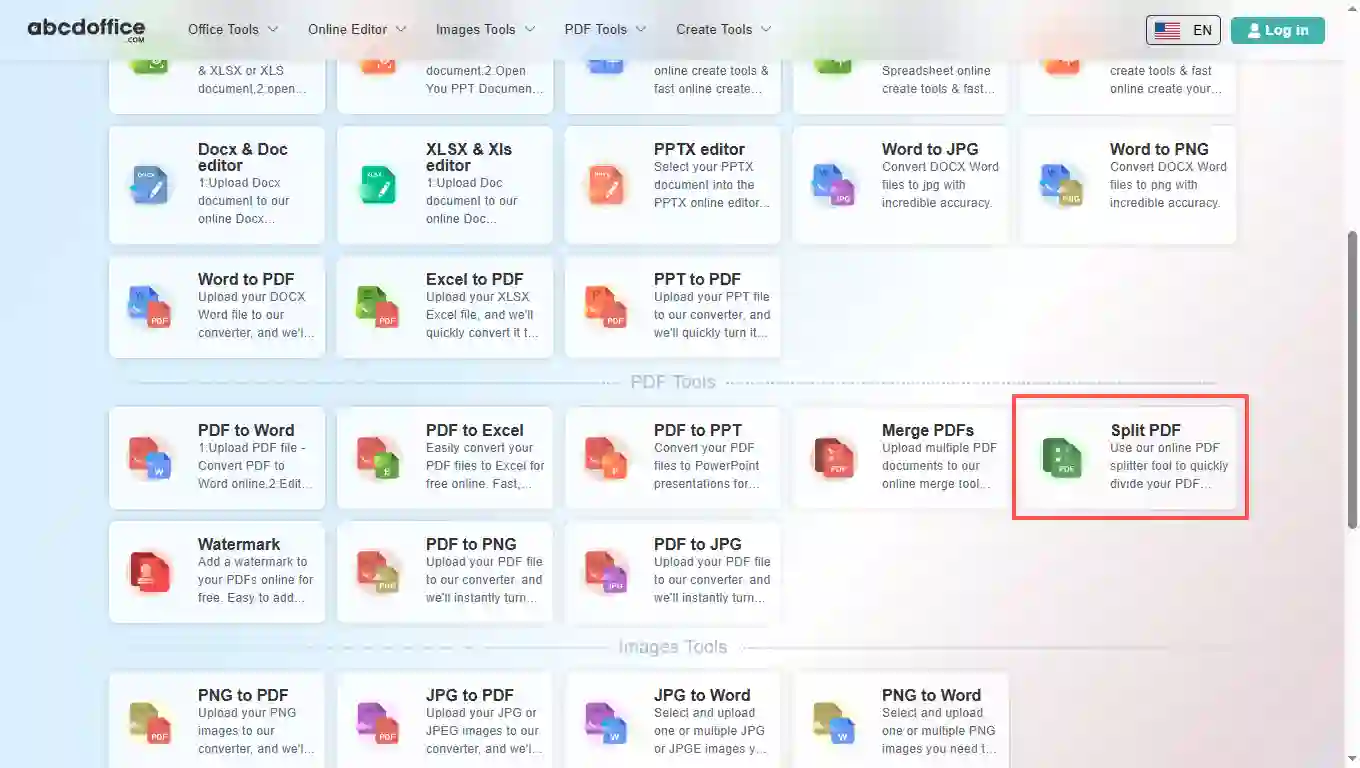
Step 1: Open Split PDF on abcdoffice.com

Open abcdoffice.com in your browser. On the homepage tools grid, click Split PDF under Online Editor or PDF Tools — or go directly to abcdoffice.com/split-pdf.html to open this split pdf online tool page.
02
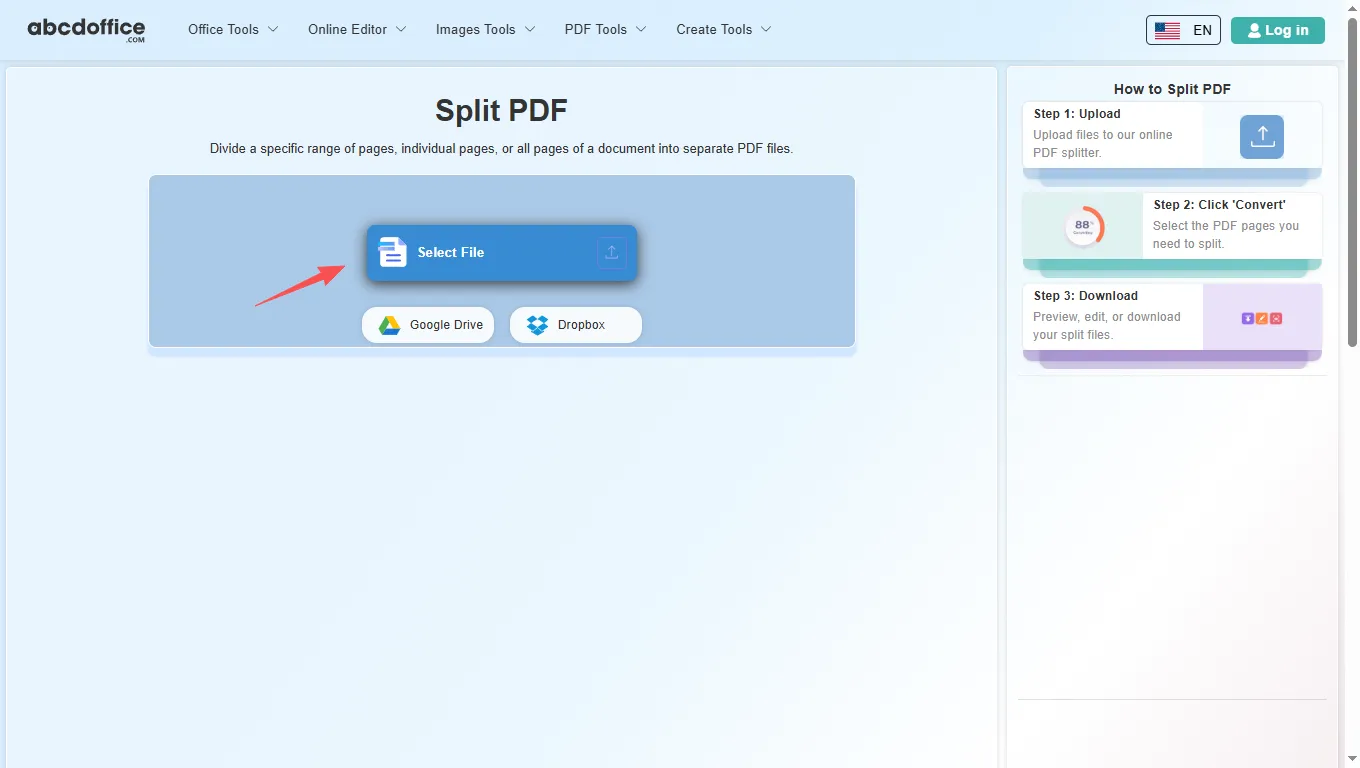
Step 2: Upload your file

On the upload screen at abcdoffice.com/split-pdf.html, click Select File or drag your PDF file into the upload area. Google Drive and Dropbox buttons appear below Select File on abcdoffice.com.

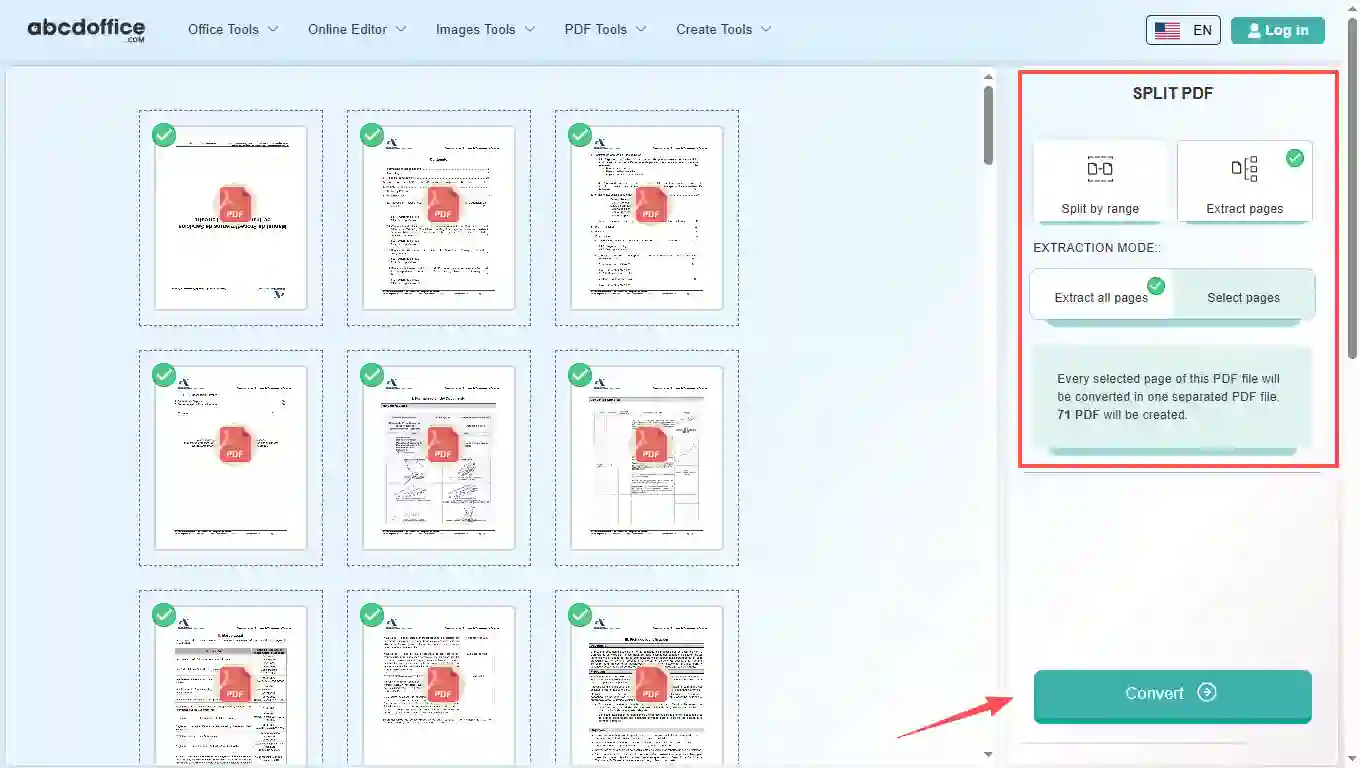
03
Step 3: Split PDF by pages online

Set how to split your PDF (page ranges or split every page), then click Convert on abcdoffice.com to process the file.

04
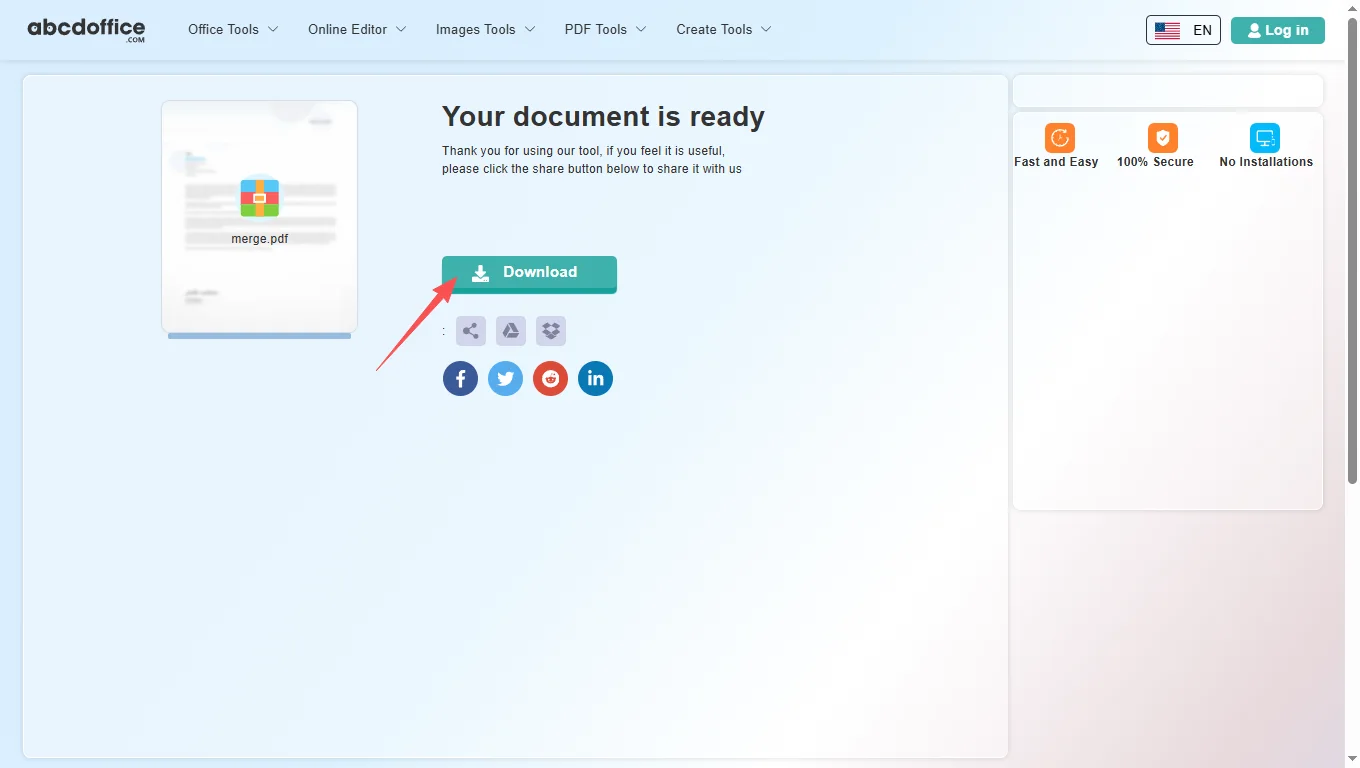
Step 4: Download split PDF files

When processing finishes, abcdoffice.com shows a download screen. Click Download to save split PDF files to your computer from this free split pdf online tool.

Your guide to split PDF online on ABCD Office

How pdf splitter works, range vs single pages, and vs Acrobat — for split pdf, divide pdf, and extract pages from pdf searches.

What is an online PDF splitter?

A PDF splitter cuts one PDF into smaller PDFs by page range or individual pages in your browser. Upload on abcdoffice.com, configure the split, convert, and download results.

Split by range, pages, or all

Use page ranges for continuous sections (e.g. pages 5–12). Pick individual pages for scattered extracts. Split all when you need every page as its own PDF.

Combined many splits? Use merge-pdf.html to recombine selected parts into one file.

Typical use cases

Researchers extract one paper from a bundle. Accounts pull a single invoice page. Teachers share one lesson PDF. The split pdf online model fits precise page extraction.

Split PDF online vs desktop Acrobat

Acrobat Organize Pages is full-featured. ABCD Office offers fast split pdf online at abcdoffice.com without install.

Privacy and quality

Upload only the PDFs you need. Review the privacy policy before splitting confidential documents.

Split PDF online vs desktop extract

See how abcdoffice.com/split-pdf.html compares on steps, install time, and time to finished split PDF files.

Method Typical steps Install required Time to finish
abcdoffice.com split-pdf.html 3–5 steps None ~1–2 minutes
Desktop Acrobat organize Many steps Often yes Longer
Manual workarounds Varies Sometimes Much longer
abcdoffice.com online
Quick workflow for upload, split & download
Desktop Acrobat organize
More setup
Manual workarounds
Slow and error-prone

Split PDF guides — extract and separate pages on ABCD Office

Guides for split pdf, pdf splitter, and extract pages from pdf — start at abcdoffice.com/split-pdf.html.

Guide

Extract one chapter from a manual

Split by page range on split-pdf.html when you only need section 3.

Upload PDF to split
Guide

Separate invoice PDF per vendor

Split a combined scan into individual PDFs for accounting folders.

Upload PDF to split
Guide

Pull appendix from a contract PDF

Save exhibits as their own file while keeping the main agreement separate.

Upload PDF to split
Guide

Split every page for bulk rename

Use split-all mode when each page becomes its own numbered file.

Upload PDF to split
Guide

No desktop tools for split

Upload once on abcdoffice.com, choose split rules, download ZIP or files.

Upload PDF to split
Guide

Split then watermark selected parts

Split first, then run watermark-pdf.html only on the confidential section.

Upload PDF to split

Frequently asked questions

Answers about split PDF — steps include abcdoffice.com/split-pdf.html.

How do I split a PDF online for free?

Use split-pdf.html — upload PDF, choose pages or range, Convert, download split files.

  1. Open abcdoffice.com/split-pdf.html in your browser.
  2. Upload PDF with Select File or drag-and-drop.
  3. Configure if needed, then click Convert on abcdoffice.com.
  4. Click Download to save the result.
How can I extract pages from a PDF without Acrobat?

The pdf splitter on abcdoffice.com runs in your browser.

  1. Open abcdoffice.com/split-pdf.html in your browser.
  2. Upload PDF with Select File or drag-and-drop.
  3. Configure if needed, then click Convert on abcdoffice.com.
  4. Click Download to save the result.
Is split pdf online free?

Yes — standard split pdf tasks on split-pdf.html without signup.

  1. Open abcdoffice.com/split-pdf.html in your browser.
  2. Upload PDF with Select File or drag-and-drop.
  3. Configure if needed, then click Convert on abcdoffice.com.
  4. Click Download to save the result.
How do I split a PDF into separate pages?

Upload on split-pdf.html, select split-all or individual pages, Convert, Download.

  1. Open abcdoffice.com/split-pdf.html in your browser.
  2. Upload PDF with Select File or drag-and-drop.
  3. Configure if needed, then click Convert on abcdoffice.com.
  4. Click Download to save the result.
Can I split only a page range from a large PDF?

Yes — use range split on abcdoffice.com/split-pdf.html for continuous sections.

  1. Open abcdoffice.com/split-pdf.html in your browser.
  2. Upload PDF with Select File or drag-and-drop.
  3. Configure if needed, then click Convert on abcdoffice.com.
Split PDF vs merge PDF — how do they work together?

Split first on split-pdf.html, then merge selected parts on merge-pdf.html.

  1. Open abcdoffice.com/split-pdf.html in your browser.
  2. Upload PDF with Select File or drag-and-drop.
  3. Configure if needed, then click Convert on abcdoffice.com.
  4. Click Download to save the result.
Is it safe to split PDFs on abcdoffice.com?

Review the privacy policy before uploading confidential files.

  1. Open abcdoffice.com/split-pdf.html in your browser.
  2. Upload PDF with Select File or drag-and-drop.
  3. Configure if needed, then click Convert on abcdoffice.com.
  4. Click Download to save the result.
Can I split pdf on mobile?

Yes — use split-pdf.html in a mobile browser.

  1. Open abcdoffice.com/split-pdf.html in your browser.
  2. Upload PDF with Select File or drag-and-drop.
  3. Configure if needed, then click Convert on abcdoffice.com.
  4. Click Download to save the result.

Split your PDF on abcdoffice.com

Upload PDF at abcdoffice.com/split-pdf.html — free split PDF online, then Download your files.