Login to your account
or
The mailbox user already exists
By clicking 'Download File,' you agree to our Terms and conditions and Privacy policy
pdf_to_excel
Save document as
Please select a file to save
docx DOCX
pdf PDF
odt ODT
txt TXT
dotx DOTX
pdfa PDF/A
ott OTT
rtf RTF
docxf DOCXF
oform OFORM
html HTML
fb2 FB2
epub EPUB
xlsx XLSX
pdf PDF
ods ODS
csv CSV
xltx XLTX
pdfa PDF/A
ots OTS
pptx PPTX
pdf PDF
odp ODP
potx POTX
pdf PDF/A
otp OTP
png PNG
jpg JPG
close

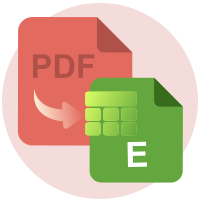
PDF to Excel Converter

Convert your PDF files to Excel documents (XLSX) with outstanding precision.

Do not close your browser Wait until your files are uploaded and processed! This might take a few minutes. :)
officeedit Next Next
File
Open Source Statement
file icon
Size
Ddfdf.pptx
5.2MB
VIEW
edit_file
How to PDF to Excel Converter
Step 1: Upload
Upload files to our online PDF to Excel converter.
add file
Edit
Step 2: Click 'Convert'
Convert PDF to Excel within seconds.
Step 3: Download
Preview, edit, or download your Excel files.
add file

What this free PDF to Excel converter supports

ABCD Office converts PDF to Excel in your browser — upload on abcdoffice.com/pdf-to-excel.html, extract tables and data into XLSX, and download without installing Adobe Acrobat or Microsoft Excel.

Input format

Upload PDF files on abcdoffice.com/pdf-to-excel.html — standard PDF documents for conversion to XLSX.

Convert in browser

Click Convert on abcdoffice.com — no desktop Acrobat install for typical conversion tasks.

Output

Download XLSX ready to edit in Office or on abcdoffice.com editor pages.

No install

Free online converter on desktop or mobile at abcdoffice.com.

How to convert PDF to Excel online on ABCD Office

abcdoffice.com/pdf-to-excel.html is the PDF to Excel converter page — upload PDF, click Convert, download XLSX. For convert-then-edit, try pdf-to-excel-editor.html.

Convert

PDF to Excel converter — PDF to XLSX free online

You have a PDF invoice, price list, or report with tables — and need cells in Excel instead of retyping every row.

  • PDF to Excel for invoices, budgets, data exports, and operational reports.
  • Convert pdf to xlsx online when Excel is not on a shared computer.
  • Open the XLSX in excel-editor.html on abcdoffice.com after download for formula fixes.
01
Step 1: Open PDF to Excel on abcdoffice.com

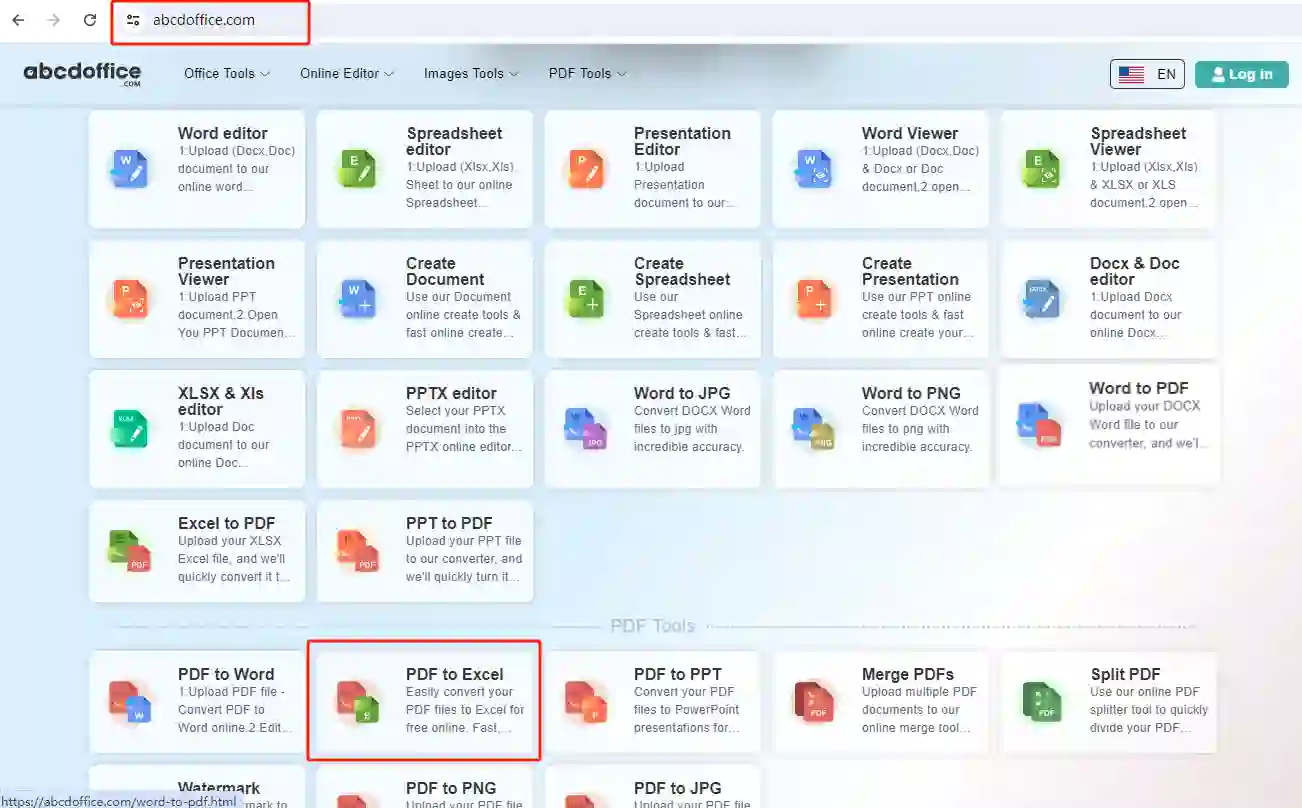
Open abcdoffice.com in your browser. On the homepage tools grid, click PDF to Excel under Online Editor or PDF Tools — or go directly to abcdoffice.com/pdf-to-excel.html to open this pdf to excel converter page.
02
Step 2: Upload your file

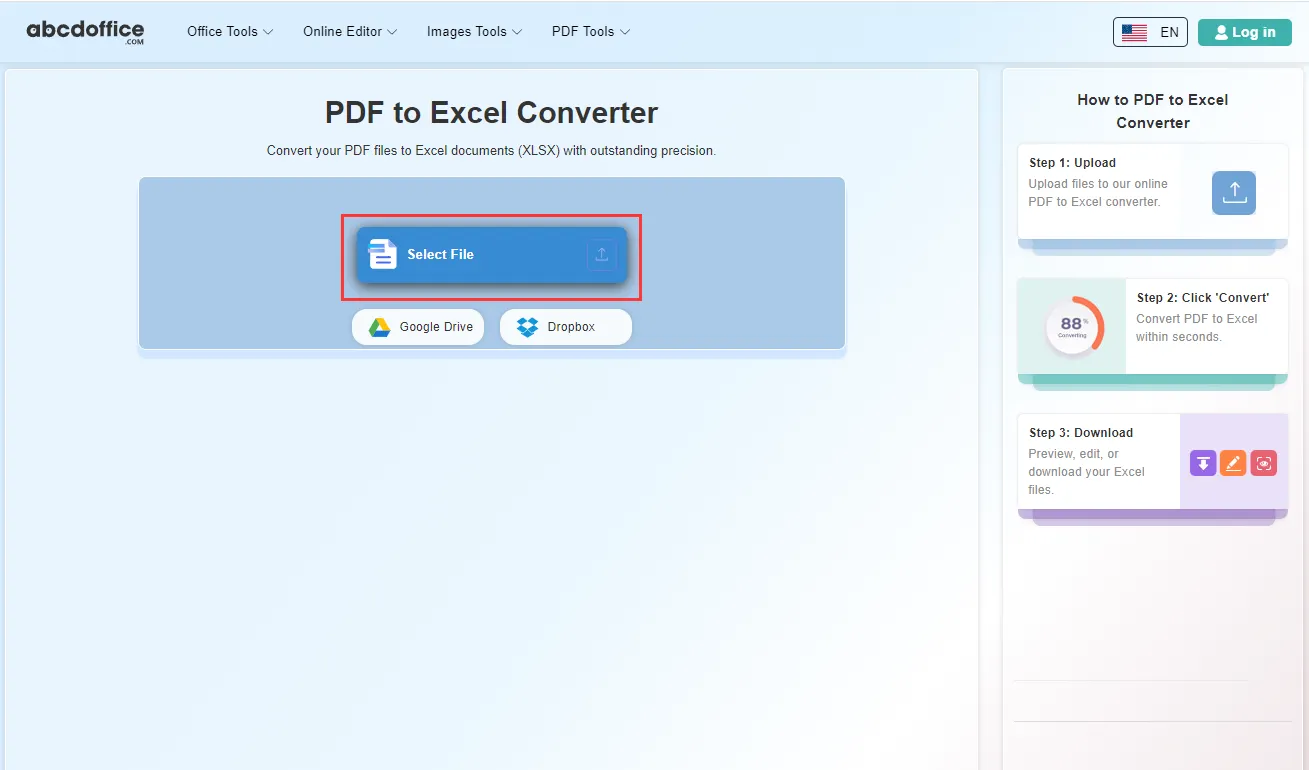
On the upload screen at abcdoffice.com/pdf-to-excel.html, click Select File or drag PDF files into the upload area. Google Drive and Dropbox buttons appear below Select File on abcdoffice.com.

03
Step 3: Convert PDF to Excel online

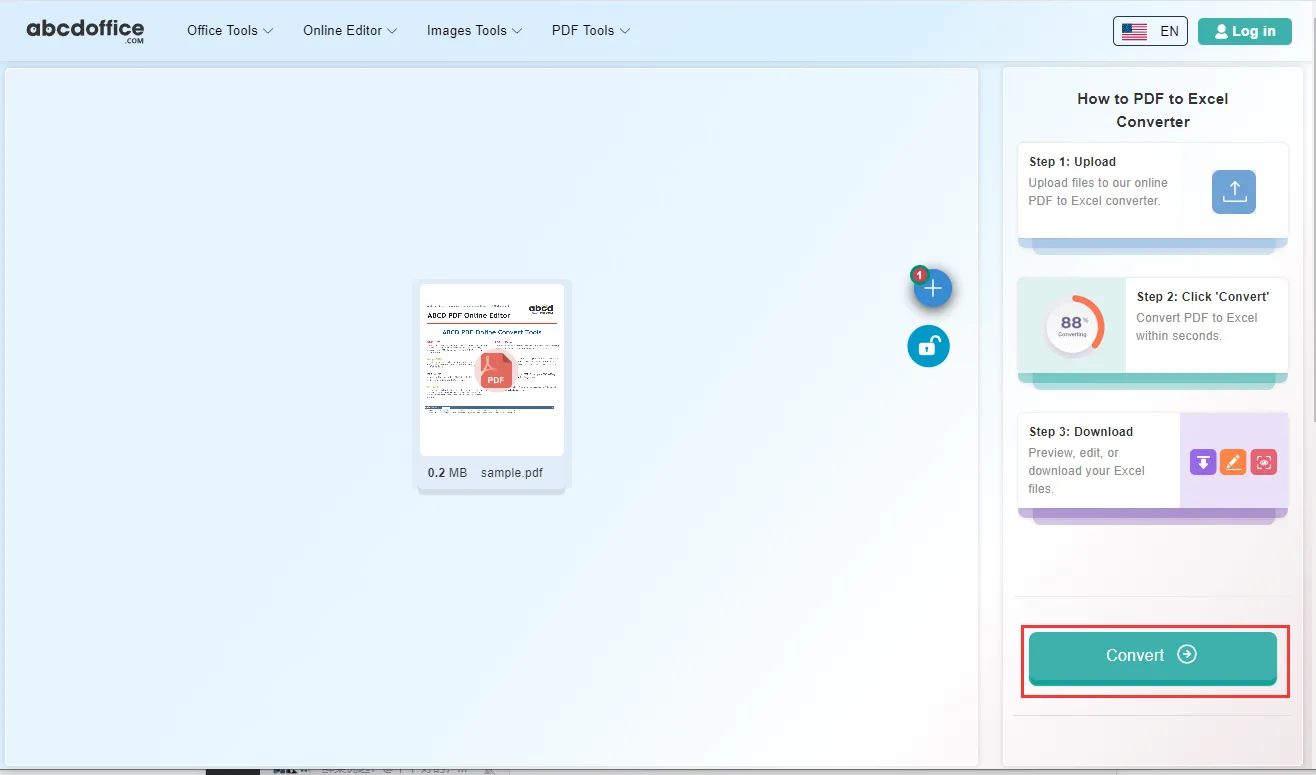
With your file uploaded, click Convert at the bottom of the page and wait a few seconds while abcdoffice.com converts PDF to Excel — no extra steps during conversion.

04
Step 4: Download XLSX or Excel files

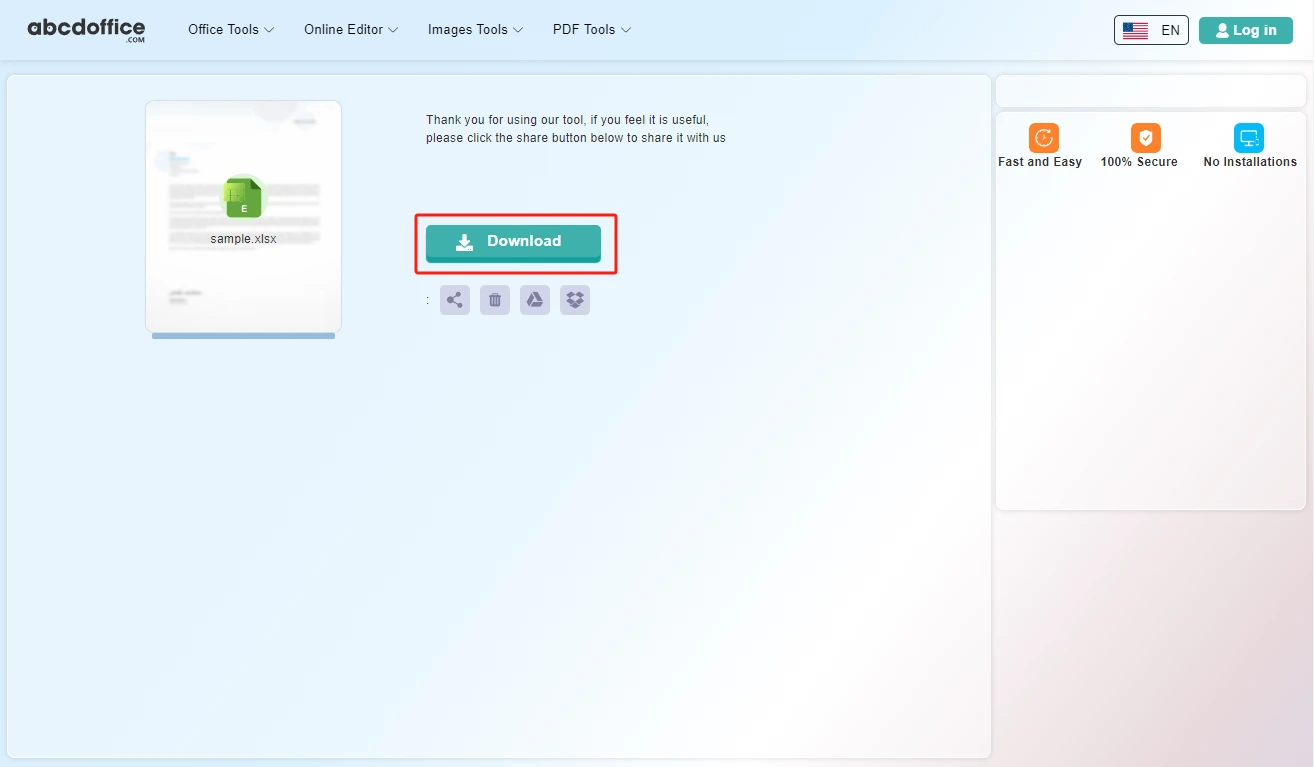
When processing finishes, abcdoffice.com shows a download screen. Click Download to save XLSX or Excel files to your computer from this free pdf to excel converter.

Your guide to PDF to Excel conversion on ABCD Office

How pdf to excel works, table extraction, and vs pdf-to-excel-editor — for convert pdf to excel, pdf to xlsx, and pdf to excel online.

What is an online PDF to Excel converter?

A PDF to Excel converter extracts tabular data from PDF pages into spreadsheet cells. Upload on abcdoffice.com, convert, and download XLSX for formulas and charts in Excel.

PDF to Excel vs PDF to Excel Editor

pdf-to-excel.html delivers a downloadable XLSX. pdf-to-excel-editor.html converts and opens the spreadsheet in the browser editor — pick based on your workflow.

Have Excel already? Use excel-to-pdf.html to export PDF, or xlsx-editor.html to edit XLSX directly.

Typical use cases

Finance pulls numbers from PDF statements. Operations digitizes supplier price lists. Researchers extract tables from published PDFs. The pdf to excel converter on abcdoffice.com fits structured data recovery from PDF.

PDF to Excel online vs manual entry

Retyping PDF tables is slow and error-prone. ABCD Office targets fast convert pdf to excel online at abcdoffice.com.

Privacy and quality

Review the privacy policy before converting financial PDFs with sensitive data on abcdoffice.com.

PDF to Excel online vs manual data entry

See how abcdoffice.com/pdf-to-excel.html compares on steps, install time, and time to finished XLSX.

Method Typical steps Install required Time to convert
abcdoffice.com pdf-to-excel.html 3–4 steps None ~1 minute
Manual typing from PDF Many steps Often yes Much longer
Desktop Acrobat + Office 5–8 steps Yes Several minutes
abcdoffice.com online
Quick workflow for upload, convert & download XLSX
Manual typing from PDF
Slow and error-prone
Desktop Acrobat export
Multiple apps and installs

PDF to Excel guides — common conversion tasks on ABCD Office

Guides for convert pdf to excel, pdf to xlsx, and pdf to excel online free — start at abcdoffice.com/pdf-to-excel.html.

Guide

Pull tables from a PDF statement

pdf-to-excel.html rebuilds rows you can fix in excel-editor.html.

Upload PDF to convert
Guide

Convert price list PDF to XLSX

Turn vendor PDF catalogs into spreadsheets for sorting and filters.

Upload PDF to convert
Guide

Budget PDF to editable cells

Finance teams convert static PDF budgets to Excel for scenario planning.

Upload PDF to convert
Guide

Scanned invoice PDF to sheet

OCR output may need cleanup — download XLSX and verify totals online.

Upload PDF to convert
Guide

Chromebook PDF data entry shortcut

Avoid retyping: convert PDF tables to XLSX in the browser.

Upload PDF to convert
Guide

Chart-ready data after conversion

Upload the XLSX to excel-editor.html to build charts from imported PDF tables.

Upload PDF to convert

Frequently asked questions

PDF to Excel FAQ for abcdoffice.com/pdf-to-excel.html — tables, invoices, and data extraction.

How do I pull invoice tables from a PDF into Excel?

Use abcdoffice.com/pdf-to-excel.html — pdf to excel conversion outputs XLSX you can sort and filter in excel-editor.html.

  1. Open abcdoffice.com/pdf-to-excel.html in your browser.
  2. Click Select File or drag your file into the upload area.
  3. Click Convert and wait until abcdoffice.com finishes processing.
  4. Click Download to save the converted file.
Can I convert PDF to Excel without desktop software?

The pdf to excel converter online uploads in the browser and returns an editable spreadsheet download.

  1. Open abcdoffice.com/pdf-to-excel.html in your browser.
  2. Click Select File or drag your file into the upload area.
  3. Click Convert and wait until abcdoffice.com finishes processing.
  4. Click Download to save the converted file.
Will pdf to excel keep column headers from a statement PDF?

Structured PDF tables convert best — open the XLSX after download and fix merged cells on abcdoffice.com if needed.

  1. Open abcdoffice.com/pdf-to-excel.html in your browser.
  2. Click Select File or drag your file into the upload area.
  3. Click Convert and wait until abcdoffice.com finishes processing.
  4. Click Download to save the converted file.
Is pdf to excel online free for a single statement?

Yes — routine pdf to excel free tasks on pdf-to-excel.html do not require an account.

  1. Open abcdoffice.com/pdf-to-excel.html in your browser.
  2. Click Select File or drag your file into the upload area.
  3. Click Convert and wait until abcdoffice.com finishes processing.
  4. Click Download to save the converted file.
Can I edit the XLSX after pdf to excel conversion?

Download the spreadsheet, then upload to excel-editor.html or xlsx-editor.html to adjust formulas and layout.

  1. Open abcdoffice.com/pdf-to-excel.html in your browser.
  2. Click Select File or drag your file into the upload area.
  3. Click Convert and wait until abcdoffice.com finishes processing.
PDF to Excel online vs manual copy-paste?

Copy-paste breaks on multi-page tables. pdf to excel online rebuilds rows faster for price lists and bank exports.

  1. Open abcdoffice.com/pdf-to-excel.html in your browser.
  2. Click Select File or drag your file into the upload area.
  3. Click Convert and wait until abcdoffice.com finishes processing.
  4. Click Download to save the converted file.
Is it safe to convert financial PDFs on abcdoffice.com?

Review policy before uploading statements with account numbers to any pdf to excel converter.

  1. Open abcdoffice.com/pdf-to-excel.html in your browser.
  2. Click Select File or drag your file into the upload area.
  3. Click Convert and wait until abcdoffice.com finishes processing.
  4. Click Download to save the converted file.
Can I convert a PDF bank export on mobile?

Open pdf-to-excel.html on mobile, upload the PDF, Convert, open the XLSX in a spreadsheet app or browser editor.

  1. Open abcdoffice.com/pdf-to-excel.html in your browser.
  2. Click Select File or drag your file into the upload area.
  3. Click Convert and wait until abcdoffice.com finishes processing.
  4. Click Download to save the converted file.

Convert your PDF to Excel on abcdoffice.com

Upload PDF at abcdoffice.com/pdf-to-excel.html — free PDF to Excel converter, then Download XLSX.